

 By
By Google Launches Experimental Search App for Windows with AI and Visual Tools
Google’s New Desktop Search Experience: Power-up Your Windows PC
In an exciting development, Google is trialling a new desktop search experience, exclusively for Windows users. Revealed in a recent blog post, the technology giant has launched a standalone search app that integrates the power of Google Search, AI capabilities, and file exploration, directly to your personal computer. The innovation doesn’t stop here, take a dip into the numerous features packed in this experimental app, currently available for testing via Google’s Search Labs for those with personal Google accounts.
Revolutionizing Search with a Dedicated App
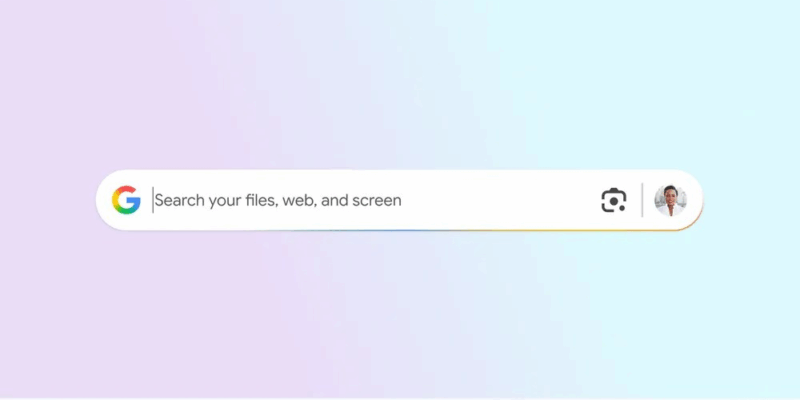
Imagine the ability to scour through your local files, browse Google Drive, and sift through web results, using just one keyboard shortcut: Alt + Space. That is precisely what the pioneering new app is offering. On triggering the shortcut, a floating search bar appears, which you can adjust in size and position to suit your workflow. This tool refreshes how you work with documents, information, or even screenshots – all without shuffling between numerous applications or browser tabs.
That’s not all; Google’s latest offering comes packed with impressive features such as Google Lens. This visually-oriented tool allows users to underline images or text on their screens to swiftly recognize objects, translate languages, or even solve mathematical equations. For instance, a student can highlight a problematic math equation and ask the AI-powered system to assist in finding a solution. Based on individual preferences, users can switch the AI Mode on or off at their convenience.
An Innovative Solution with Design Parameters from Mac and Chrome
Reminiscent of the user-friendly Google Search, the new desktop app enables users to flip between various result types like All, Images, Videos, Shopping, etc. Users can also select between dark and light themes to complement their desktop aesthetics. Borrowing design elements from Spotlight on macOS, the unified search bar offers an intuitive way to browse both local and web-based content.
Mirroring Chrome’s familiar setup procedure, the new app asks users to sign in using their Google account. The persistent availability of the search bar, on using the adjustable shortcut, is a handy feature. Should you wish to modify the shortcut, or make other changes, simply click on the profile picture to access Configurations.
Join the Experiment: Availability and User Requirements
The app is currently in the testing phase and available in English for users residing in the United States. To get involved, you’ll require a PC running on Windows 10 or higher. Visit the Search Labs page to be a part of this cutting-edge experiment.
In conclusion, this experimental Windows app from Google marks a significant stride towards incorporating AI and visual search tools within the desktop interface. With an array of features that rival both the macOS Spotlight and Microsoft’s Copilot Plus PCs, this app could invigorate the way Windows users interact with their files and the web. Ready to leap into the future of desktop search? Now might just be the perfect time to test the waters.
Originally reported on The Verge


